
Architecture
Backchannel is a React SPA, a FastAPI backend, and PostgreSQL – deployed either as the Docker Compose stack or as the desktop bundle, a PyInstaller launcher with an embedded per-user PostgreSQL (see Quickstart) – plus external AI providers (Google Gemini, OpenAI) and local ONNX models for voice activity detection, speaker embeddings, and optional local transcription and live captions.
Diarization always runs on your hardware, and transcription and live
captions can too (the local ONNX entries in MODEL_REGISTRY cover batch
transcription plus the local-parakeet-live live captioner), but the
analysis agents have no local ONNX path:
backend/app/services/llm.py routes every text call
to Google, OpenAI, or any OpenAI-compatible endpoint you point them at
(Ollama, LM Studio, vLLM). Pairing a local endpoint with local ONNX
transcription makes a deployment local end to end, with no cloud key
anywhere. The Privacy First toggle enforces exactly that boundary: it judges a
model by where it runs, so agents pointed at an endpoint on your machine or
LAN keep working while anything that would send data off your network is
refused. See
Privacy First mode for the
admission rule and what the mode covers.
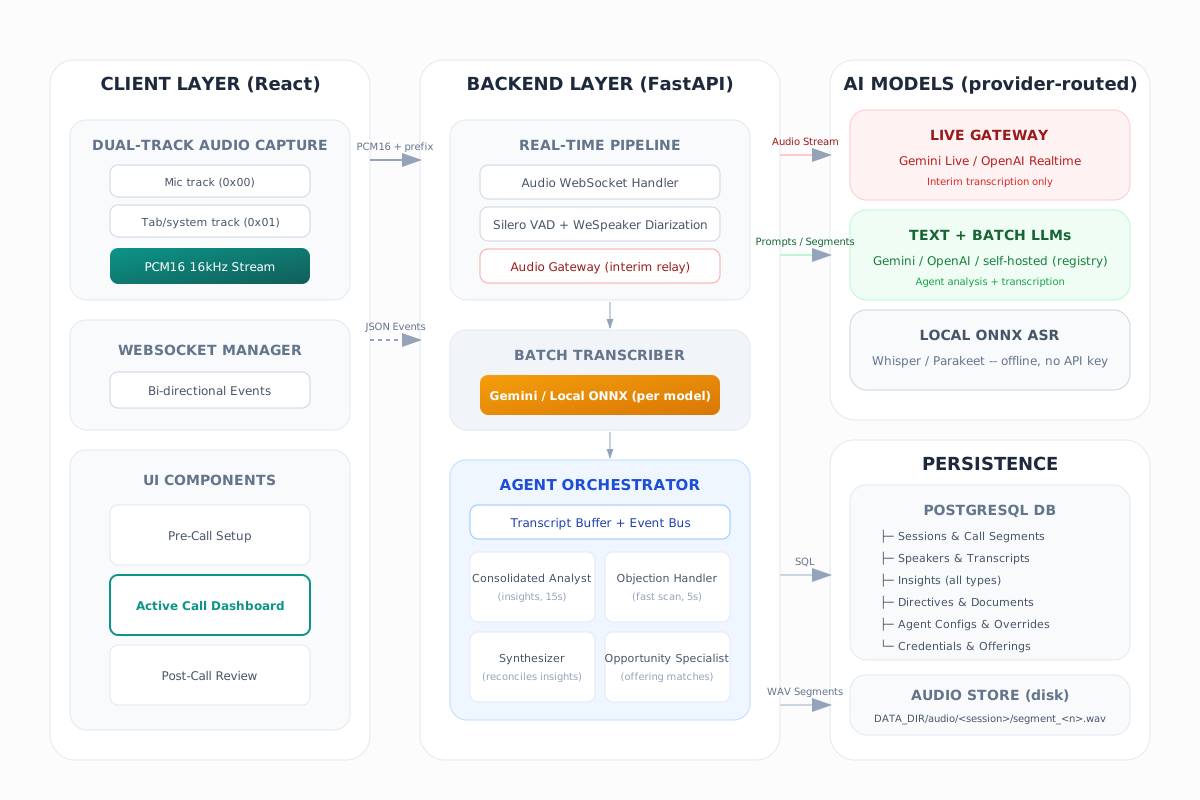
The live call path
Section titled “The live call path”- Capture –
frontend/src/hooks/useAudioCapture.tsgets microphone audio viagetUserMedia(and optionally tab/system audio via screen capture), converts it to PCM16 16 kHz mono chunks, and sends binary WebSocket frames with a 1-byte track prefix (0x00mic,0x01system). - Ingest –
backend/app/ws/audio_handler.pyaccepts/ws/{session_id}, opens a call segment, and fans the audio out to two paths: the interim audio gateway and the diarization pipeline. Mixed mic+system audio is also appended to a per-segment WAV recording. - Diarize –
backend/app/services/speaker_diarizer.pyruns Silero VAD to find speech, then WeSpeaker ResNet152 speaker embeddings to assign an auto speaker ID (auto_1,auto_2, …) to each segment. Auto IDs are mapped to databaseSpeakerrows, creating “Participant N” rows when a new voice appears. In split-track calls, mic segments bind to the sole configured local user while system-audio segments retain normal remote diarization. - Transcribe –
backend/app/services/batch_transcriber.pywraps each diarized segment as WAV and transcribes it (Gemini Flash by default, or a local ONNX model – see Audio Pipeline). Low-energy segments, known phantom phrases, and single-word outputs are filtered. - Persist and publish – transcript entries are saved to PostgreSQL and
pushed to the browser as
transcriptWebSocket messages. - Analyze –
backend/app/services/agents/orchestrator.pyfeeds final transcript text into a shared in-memory buffer that the text agents read on their own schedules. Insights come back to the browser asquestion,insight_updated,insight_elevated, andquestion_answeredmessages. See Agent System.
The interim audio gateway
Section titled “The interim audio gateway”In parallel with the batch path, backend/app/services/gemini_live.py opens
a Gemini Live session as a silent listener (or
backend/app/services/openai_realtime.py when the audio gateway agent is
configured with an OpenAI model, or
backend/app/services/local_live_captioner.py – an on-device Parakeet ONNX
captioner, no cloud – when it is set to local-parakeet-live). The gateway
relays streaming interim transcription to the frontend as
interim_transcript messages, giving users live feedback seconds before the
diarized, speaker-attributed transcript lands.
The gateway is an audio relay only – all analysis runs over the saved transcript text, never over raw audio.
Frontend structure
Section titled “Frontend structure”Main state lives in frontend/src/App.tsx, which switches between three
views:
- PreCallView – session setup: speakers, directives, document upload, transcript/audio import, per-session agent selection
- ActiveCallView – live call controls, transcript and interim transcript display, insight list, audio level indicator, mid-call directive bar
- PostCallView – review tabs for Briefing (the default), Insights, Transcript, Chat, Speakers, Documents, Directives, and Tokens; supports resume, export, delete, and speaker rename
Admin surfaces (routed through ManagementView): AdminPanel with tabs
Agents, Transcription & Audio, Connections (provider keys and self-hosted
endpoints), and About (version and release notes), plus OfferingsManager
and KnowledgeManager for the offering catalog and knowledge sources.
Key hooks:
| Hook | Role |
|---|---|
useSession |
Loads session metadata, directives, documents, questions, call segments, speakers |
useWebSocket |
Manages /ws/{session_id} JSON and binary traffic |
useAudioCapture |
Mic/system capture, audio level, PCM16 conversion |
The frontend stores all insight item types in the Question shape for
historical reasons – check frontend/src/types/index.ts before renaming
fields.
Backend key files
Section titled “Backend key files”| Area | File |
|---|---|
| FastAPI app, router registration, startup schema patching | backend/app/main.py |
WebSocket live-call layer (entry point; the layer is five files: handler plus audio_messages.py, audio_pipeline.py, audio_runtime.py, audio_persistence.py) |
backend/app/ws/audio_handler.py |
| SQLAlchemy models | backend/app/models.py |
| Pydantic schemas | backend/app/schemas.py |
| Settings and model registry | backend/app/config.py |
| Diarization | backend/app/services/speaker_diarizer.py |
| Batch transcription | backend/app/services/batch_transcriber.py |
| Transcriber routing (local vs Gemini) | backend/app/services/local_transcriber.py |
| Gemini Live gateway | backend/app/services/gemini_live.py |
| OpenAI Realtime gateway | backend/app/services/openai_realtime.py |
| On-device live captioner | backend/app/services/local_live_captioner.py |
| Provider-routed text LLM calls | backend/app/services/llm.py |
| Self-hosted endpoint storage and model projection | backend/app/services/custom_endpoints.py |
| Privacy First admission | backend/app/services/privacy.py |
| Local model fit test | backend/app/services/local_fit.py |
| Call-start capacity admission | backend/app/services/capacity_admission.py |
| Desktop update service | backend/app/services/update_service.py |
| Token usage persistence and aggregation | backend/app/services/token_usage.py |
| Post-call briefing synthesis | backend/app/services/briefing_synthesis.py |
| Agent orchestrator | backend/app/services/agents/orchestrator.py |
| Per-segment call audio recording | backend/app/services/audio_store.py |
Persistence
Section titled “Persistence”PostgreSQL stores sessions and session groups, call segments (with paths to
recorded audio), speakers, transcript entries, insights (the questions
table holds every item type), directives, documents, agent configurations
and per-session overrides, offerings and knowledge sources, and encrypted
provider credentials. Recorded audio and downloaded model weights live on
disk under DATA_DIR (a Docker volume in Compose).