backchannel

One request reads the call through every lens

Backchannel's analyst reads the latest stretch of a live call once, through every lens you configure, and tags each finding with the lens that found it. This page shows why it works that way and what happens on each cycle, using a real run on a fictional account.

One request every 40 s · latest 30 transcript lines · lenses editable in Admin → Agents · MIT licensed

The walkthrough

Five steps, about a minute

It plays on its own. Pause it, step with the arrows, or jump to a step. With reduced motion turned on, each step shows fully built.

01 / 05

The straightforward design

Transcript window · last 30 lines

[S4] MayaOur change advisory board needs ten working days even for isolated tests because identity is involved.

[S3] OwenThat split works, but the clinical application owners must sign the validation result.

[S1] MeI will send the fixed pilot scope, separate managed-operations option, and operating boundary by Thursday noon.

[S4] MayaAdd the board-ready evidence outline. If I can see the final shape now, I can clear it with the insurer before the test.

+ 26 earlier lines
Observer1 call
Pilot scope and operating boundary due Thursday noon
Opportunity Scout1 call
Managed recovery operations after the pilot
Action Tracker1 call
Send the pilot scope by Thursday noon
3 calls every cycle 3 copies of the same transcript 0 findings shared between agents
02 / 05

A lens is a section of one prompt

Analysis lensesAdmin → Agents
Strategic Follow-Up Questionsquestion
Strategic Observationsobservation
Product & Service Opportunitiesopportunity
Action Items & Commitmentsaction_item
Delivery Risksrisk · custom
## Meeting Context
## Lens 1: Strategic Follow-Up QuestionsThink like a seasoned investigative journalist and strategic sales advisor…Tag every finding from this lens with "item_type": "question" and "lens": "question".
## Lens 2: Strategic ObservationsThink like a strategic intelligence analyst…Tag every finding from this lens with "item_type": "observation" …
## Lens 3: Product & Service OpportunitiesThink like a senior solutions consultant…Tag every finding from this lens with "item_type": "opportunity" …
## Lens 4: Action Items & CommitmentsThink like an executive assistant…Tag every finding from this lens with "item_type": "action_item" …
## Lens 5: Delivery RisksThink like a delivery lead who has watched good plans slip…Tag every finding from this lens with "item_type": "risk" and "lens": "risk".
## Output Format
{"item_type": "question|observation|opportunity|action_item|risk", "question": …}
03 / 05

One request per cycle

Request
Instructions
  • Meeting context
  • 5 lens sections
  • Output format
  • Participants S1–S4
8,487 chars · same every cycle
This cycle
  • Already on the board
  • Recent transcript, 30 lines
5,129 chars
40 s
gemini-3.8-flash
1 call · 4.8 s
Reply · 6 findingsevery item: item_type, question, rationale, source_context, speaker_id, directive_source, lens
questionWhat specific criteria does the insurer require in the evidence outline to grant pre-clearance before the validation test?enabledrepeat
observationThe proposed pilot budget avoids procurement friction by falling directly within pre-allocated resilience funds.enabledrepeat
opportunityOffer a post-pilot Managed Recovery Operations contract governed by a strict tenant-boundary operating model.enabledalready on board
action_itemSend the clinical and infrastructure owner list and confirm the clinical owner for Tuesday's session by tomorrow.enabledrepeat
action_itemDeliver the fixed pilot scope, managed operations option, one-page operating boundary, and board-ready evidence outline by Thursday noon.enabledalready on board
riskA 10-day Change Advisory Board review for identity leaves zero margin if CAB submission slips on day one.enabledrepeat
4 saved and streamed to the live feed2 dropped as repeats of insights already saved
04 / 05

Change a lens, change the next request

Meeting type
Client conversationInternal check-in
## Lens 1: Strategic Follow-Up Questions
## Lens 2: Strategic Observations
## Lens 3: Product & Service Opportunities
## Lens 43: Action Items & Commitments
## Lens 54: Delivery Risks
item_type: question|observation|opportunity|action_item|riskitem_type: question|observation|action_item|risk

Offering matching is off for internal meetings, so the Opportunity lens is never sent.

Add a lens + Add Lens
Lens nameDelivery Risks
Findings surface asCustom type: risk
Prompt sectionThink like a delivery lead who has watched good plans slip…
Action Items27 Observations35 Questions36 Delivery Risks3
05 / 05

Tagged findings, in the app

Live Insights feed filtered to four lens types. Each card carries a lens badge such as Delivery Risks or Strategic Observations.
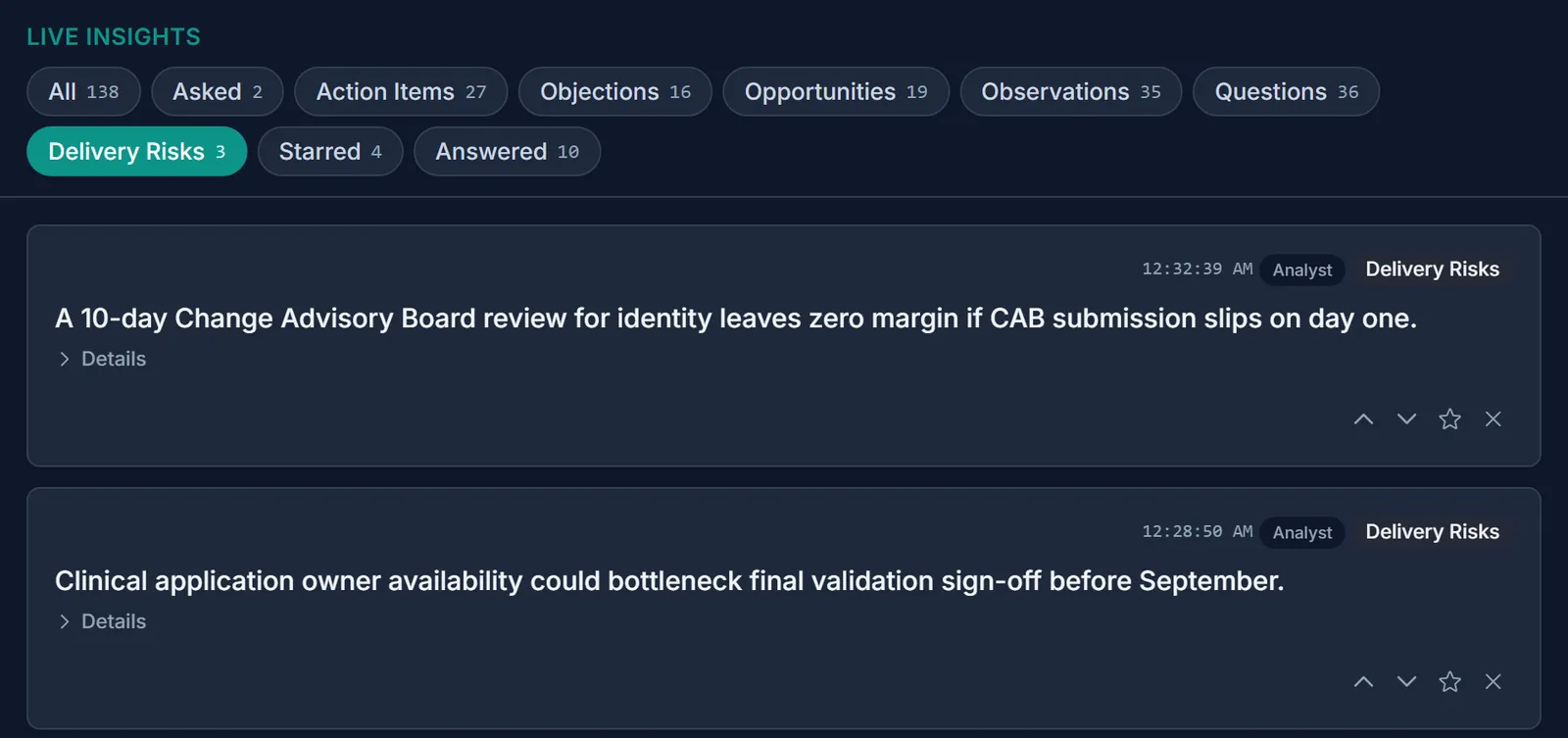
The same feed filtered to the custom Delivery Risks chip.
Post-call Insights tab with a Delivery Risks section.
insights.xlsx · Insights sheet
TypeLensInsight
RiskDelivery RisksA 10-day Change Advisory Board review for identity leaves zero margin…
QuestionStrategic Follow-Up QuestionsWhat specific criteria does the insurer require…
ObservationStrategic ObservationsThe proposed pilot budget avoids procurement friction…
  • BadgeEach card names the lens that produced it.
  • Filter chipEvery type gets a chip, custom types included.
  • Post-call sectionAfter the call, each type gets its own section.
  • ExportThe workbook's Lens column keeps the same tags.

Give each kind of finding its own agent and every agent re-reads the same transcript on every cycle. You pay for that transcript once per agent. The agents never see each other's findings, so two of them can report the same commitment.
In the app

What it looks like in Backchannel

The same run, on the same fictional account. The Delivery Risks lens was added through Admin, and its findings came back from the model tagged risk.

Configure a lens

Admin → Agents → Consolidated Analyst. A lens is a name, an insight type, and a prompt section. Pick one of the four built-in types, or type a new one and the app treats it as its own kind of finding. Switching a lens off removes its section from the next request.

The Analysis Lenses editor with five lenses switched on. Delivery Risks is expanded: Findings Surface As is set to Custom type with the slug risk, and its prompt section begins Think like a delivery lead who has watched good plans slip.
FIG. 1Five lenses, one of them custom. The help text under the type names what a custom type gets: its own filter chip, summary section, and export label.

During the call

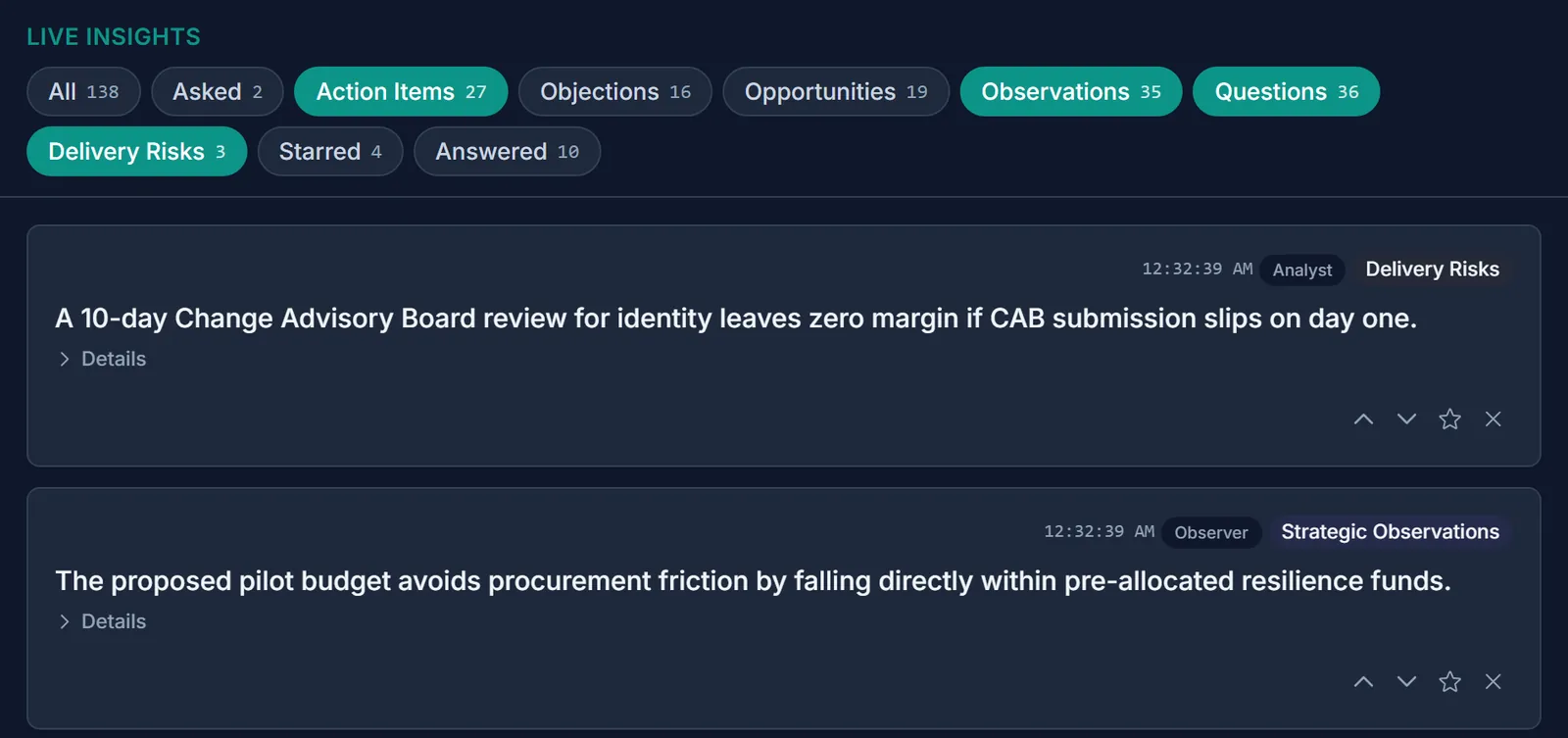
Every card carries the lens that found it, so a renamed or custom lens shows up under its own name. The filter row gains a chip for each type present in the feed, custom types included.

Live Insights with the Action Items, Observations, Questions and Delivery Risks chips selected. The top card, badged Delivery Risks, reads: A 10-day Change Advisory Board review for identity leaves zero margin if CAB submission slips on day one. The next, badged Strategic Observations, reads: The proposed pilot budget avoids procurement friction by falling directly within pre-allocated resilience funds.
FIG. 2Lens badges on live cards, and a Delivery Risks chip beside the built-in types.

After the call

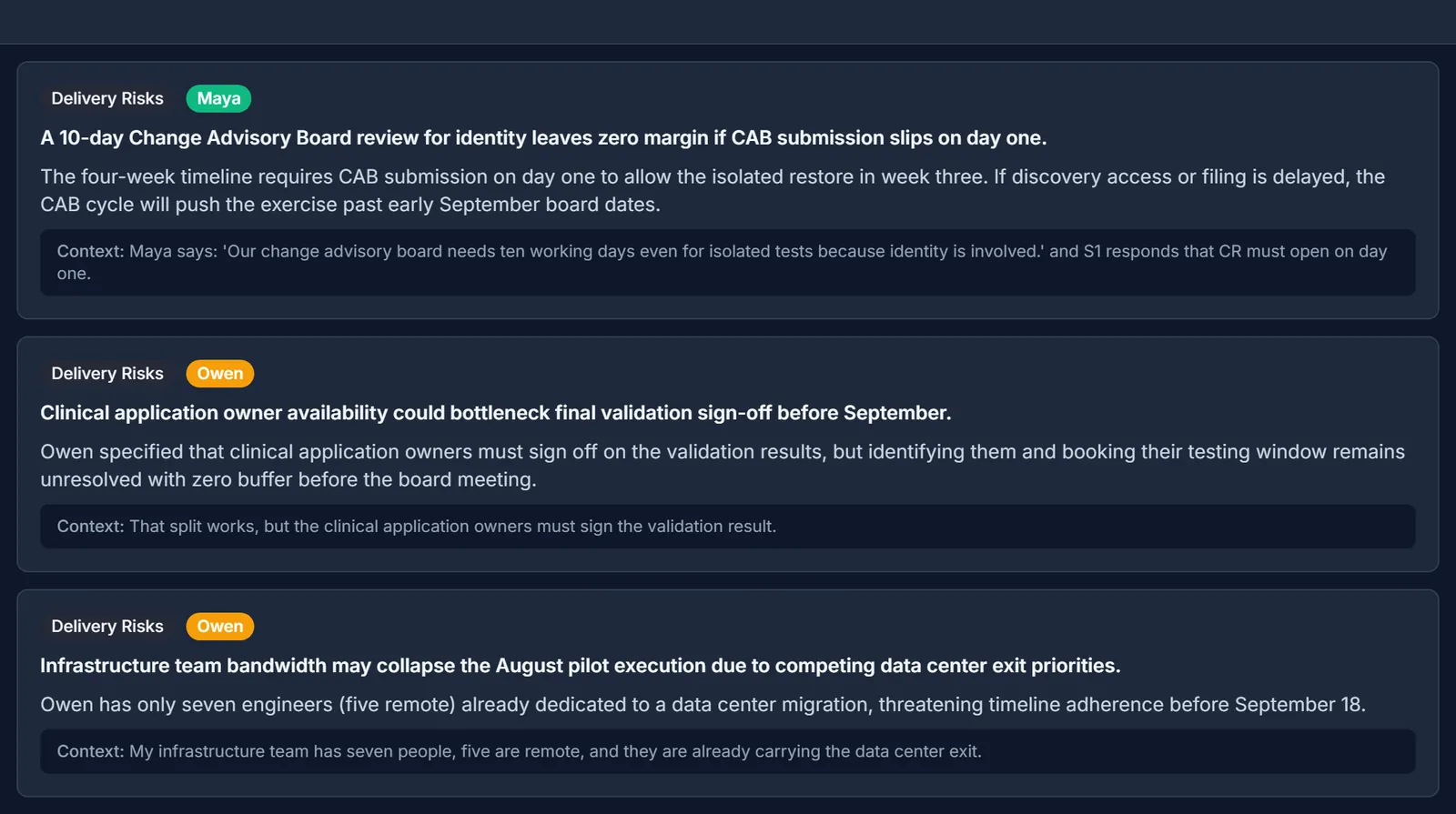
The Insights tab gives each type its own section, headed by the lens name. Each card keeps its speaker, the rationale, and the line that triggered it.

The post-call Insights tab, Delivery Risks section. Three cards: the ten-day Change Advisory Board review attributed to Maya; clinical application owner availability attributed to Owen; and infrastructure team bandwidth attributed to Owen, each with a rationale and the transcript line that triggered it.
FIG. 3Three Delivery Risks from the run, in their own post-call section. The first card's context reads “S1 responds”: the model wrote a speaker tag the prompt tells it not to write, and the page shows the output as it came back.
TypeLensInsight
RiskDelivery RisksA 10-day Change Advisory Board review for identity leaves zero margin if CAB submission slips on day one.
QuestionStrategic Follow-Up QuestionsWhat specific criteria does the insurer require in the evidence outline to grant pre-clearance before the validation test?
ObservationStrategic ObservationsThe proposed pilot budget avoids procurement friction by falling directly within pre-allocated resilience funds.
Action ItemAction Items & CommitmentsSend the clinical and infrastructure owner list and confirm the clinical owner for Tuesday's session by tomorrow.
FIG. 4Rows from the session's insights workbook, Insights sheet. The Lens column is filled in from the same tag.
Reference

How it works, precisely

Defaults as shipped in v0.6.6. File paths point into the open-source repository, relative to backend/app/ unless noted.

PartBehaviorSource
CycleEvery 40 seconds by default, plus one final pass at End Call. A cycle is skipped when the transcript has not changed.services/agents/orchestrator.py
WindowThe latest 30 transcript lines from the last five minutes, with speakers tagged S1, S2 and so on.services/agents/base.py
LensA name, an insight type and a prompt section, stored with the analyst's settings. The prompt asks for at most 3 findings per lens.services/agents/prompts.py
ReplyEvery finding has the same seven fields whatever lenses are on. The lens decides the item_type and lens values.services/agents/consolidated_analyst.py
ChecksFindings of a type with no enabled lens are dropped. So are near-repeats of insights saved in the last five minutes.services/agents/orchestrator.py
Meeting typeThe Opportunity lens is only sent for client and customer delivery conversations, where offering matching runs.services/meeting_context.py
Custom typesGet a badge, a filter chip, a post-call section and an export label. Answer tracking stays with questions, and offering matching with opportunities.frontend/src/utils/insightTypes.ts
Trade-offAll lenses share one model, one cycle and one transcript window. If that request fails, the cycle produces nothing for any lens.services/agents/consolidated_analyst.py

Alderwake Health Network and everyone in it are fictional. The call comes from the showcase seed in showcase/seed_demo.py. Step 1 sketches the design Backchannel avoids, so its three findings are examples. Everything from step 3 on is real output: three analyst cycles run with gemini-3.8-flash on 25 September 2026 against an isolated demo stack, then rendered by the app. Before saving, each finding went through the orchestrator's word-overlap test against every insight already in the session, which dropped two in the cycle shown. That cycle returned six findings in 4.8 seconds.